JARVIS
Run Claude everywhere. At the same time.
One task. Your entire fleet. No SSH. No tmux. No context switching.
Works with Claude Pro · 2 accounts · 4 machines · No API key
# Before JARVIS
$ssh atlas# open terminal 1
$ssh pixel# open terminal 2
$ssh nova# open terminal 3
$claude run task# run an agent
$waiting...
$switch to next machine
# 4 machines. 4 terminals. 1 agent at a time.
I built JARVIS so I'd never have to do that again.
Four machines.
Four opinions.
Zero agreement.
We gave all four agents the exact same architecture question. WebSockets. REST. "Both wrong." Pragmatic tradeoffs. Four answers. Four different reasons. One tiebreaker vote.
Every hard decision is a debate waiting to happen.
Run it on your machines. See where your agents disagree. Then decide.
Your Fleet.
One Mission Control.
JARVIS connects as many machines as you need over SSH and Tailscale. Each one runs its own Claude agents — you see everything from a single dashboard.
Your code never leaves your machines.
No cloud servers. No telemetry. No API calls home — because there are no JARVIS servers. Everything runs on your hardware, under your control.
Three capabilities.
One dashboard.
Dispatch unlimited Claude agents simultaneously across all your machines. No queuing, no waiting.
Live JSONL streaming from every agent. See tool calls, thoughts, and outputs as they happen.
Ping-pong planning mode with your agents. Branch management, visual diffs, collaborative iteration.
Up and running
in four steps.
Add your machines to a simple TOML file. JARVIS auto-detects local vs remote.
JARVIS establishes SSH connections via Tailscale. Health checks run automatically.
Type a task in the Command Bar. Select one machine or your entire fleet.
Your agents work in parallel. Mission Control streams every action in real-time.
host = "local" · host = "pixel" · host = "nova" Your machines. One network.
JARVIS runs on your main machine and reaches out to the rest over Tailscale. No open ports. No VPN config. No cloud in the middle.
Why JARVIS
Why not just open 4 terminals?
You could. Here's what that actually looks like.
Before — The manual way
- 4 SSH sessions. 4 terminal windows.
- One agent at a time. Everything else waits.
- Switch machines manually to check progress.
- Context switch every 2 minutes.
- A task fails silently. You find out 20 minutes later.
- No coordination. No shared state. No overview.
With JARVIS
- One Command Bar. All machines.
- Dispatch to 1 machine or your entire fleet.
- Every agent streams live — tool calls, outputs, thoughts.
- Machines work in parallel while you focus.
- Failures surface immediately. You never miss a thing.
- Full coordination from a single dashboard.
JARVIS doesn't replace terminals. It replaces the mental overhead of juggling them.
Watch JARVIS
orchestrate your fleet.
One task. Four machines working in parallel. Every tool call, every output — live.
# ~/.config/jarvis/config.toml

[[machines]]
id   = "atlas"
host = "local"        # this machine
os   = "macos"

[[machines]]
id   = "pixel"
host = "pixel"        # SSH alias
os   = "linux"
gpu  = "RTX 3070"

[[machines]]
id   = "nova"
host = "nova"
os = "windows"Type a task. Select machines. Hit enter. Agents start immediately.
Every tool call, thought, and output — streamed live as it happens.
Mac Mini M4 Pro, Ryzen 7 + RTX 3070, i5 + RTX 3060. Tested on real machines.
Everything in one view.
Four machines. Sixteen agents. Every tool call, every output — one window. No switching, no waiting, no missed context.
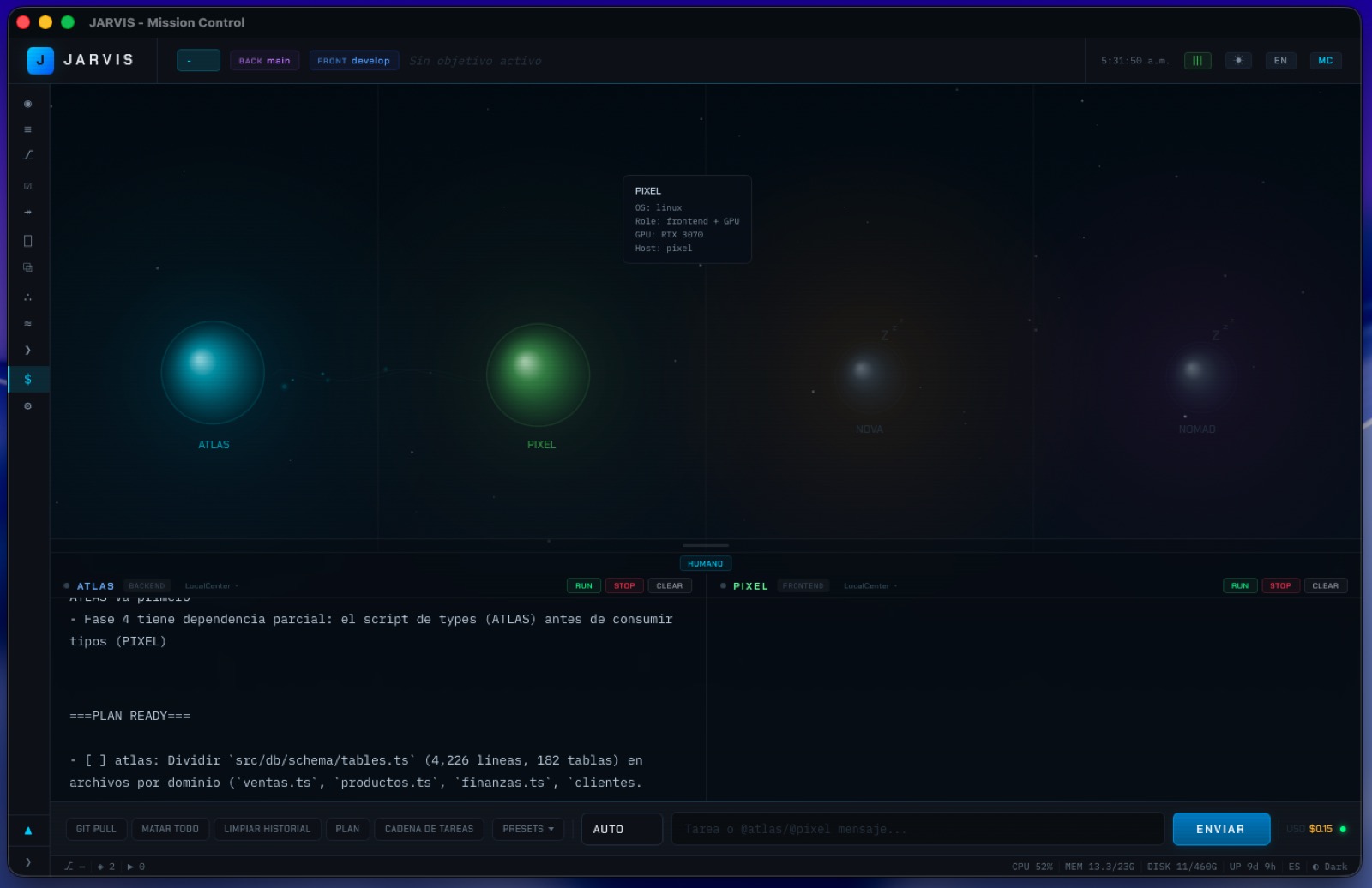
Watch JARVIS work.
From zero to a 4-machine fleet in minutes. Real sessions, real code, no cuts.
Built for Claude.
Open to everything.
JARVIS starts with Claude Code because it's the best. More model support is on the way.
Serious tech
for serious work.
You already pay for Claude.
JARVIS multiplies what you do with it.

Built for developers
who think in fleets.
Free forever. Open source. Runs entirely on your hardware.
No spam. We'll reach out when early access opens.
macOS · Linux · Windows · No cloud dependency